- Business automation means using software to run repeatable work, such as data entry, follow ups, scheduling, invoicing and reporting, without a person doing each step.
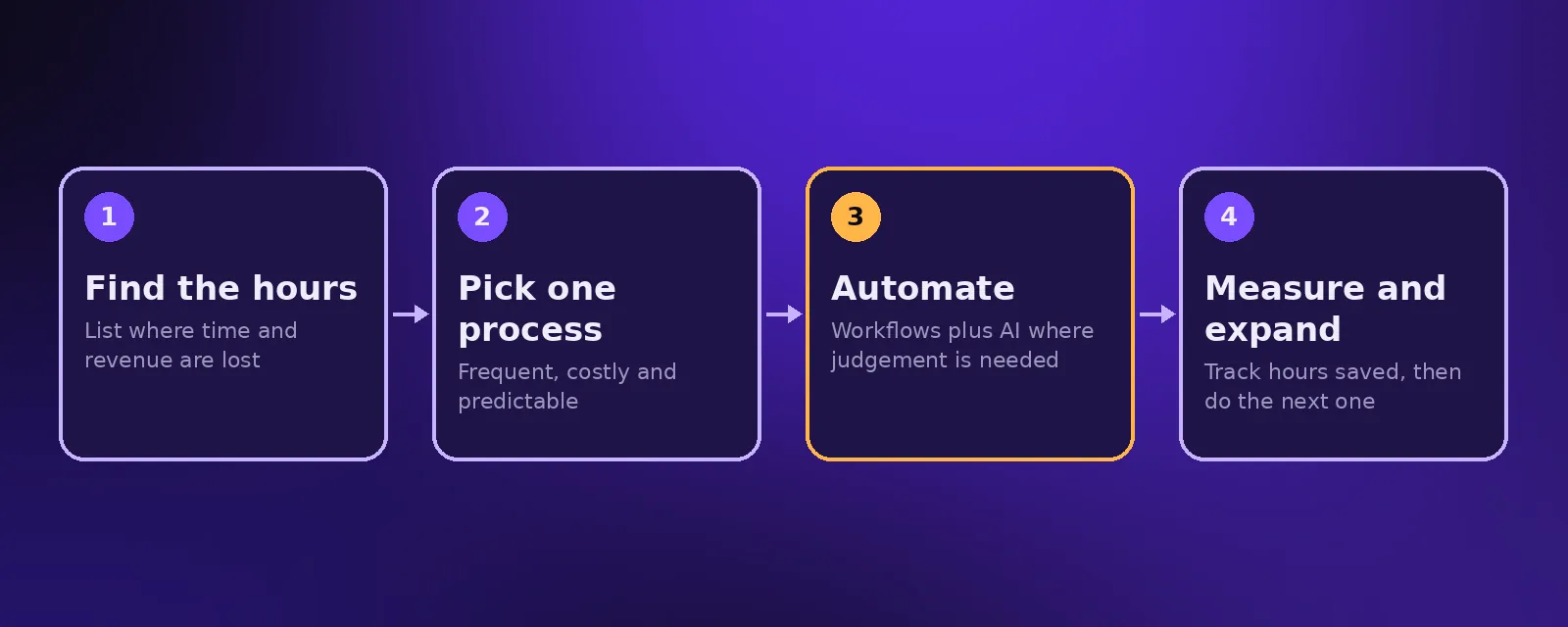
- The best automation solutions start where the most hours are lost: lead handling, customer questions, admin between systems and reporting.
- Combine simple workflows with AI only where judgement is needed, measure the hours saved, and expand one process at a time.
Every growing business hits the same wall: more customers means more emails, more calls, more data to copy and more reports to build. Business automation removes that wall by letting software handle the repeatable parts of the work, so your team can focus on the parts that need a person.
What is business automation?
Business automation is the use of technology to carry out business tasks and processes with little or no manual effort. A trigger, such as a new order or a form submission, starts a sequence of steps that run on their own: records are updated, messages are sent, documents are created and people are notified only when they need to act. For a deeper definition, see what is automation.
Types of automation technology
- Workflow automation. Connects your apps so data moves between them automatically, using tools like n8n, Make or Zapier.
- Robotic process automation (RPA). Software bots copy what a person does on screen, useful for older systems without APIs. See RPA services.
- AI agents. Understand language, make decisions and use tools, so they can answer customers, qualify leads and read documents. See AI agents for business.
- Built in automation. Most CRMs, help desks and accounting tools include their own rules and sequences.
What to automate first
Score every idea on three questions: how often it happens, how much time or revenue it costs today, and how predictable the right answer is. The processes that score highest on all three are where to start. In most businesses that means:
1. Lead capture and follow up
Every lead from your website, ads and phone lands in the CRM, gets an instant reply and is followed up until it books or says no. Fast follow up is one of the most reliable ways to win more business. See CRM automation.
2. Customer questions
An AI agent answers common questions on your website, WhatsApp and phone in seconds, and passes complex cases to your team with the context attached. See customer service automation.
3. Admin between systems
Orders into accounting, new clients into your project tool, signed contracts into onboarding. Any time someone copies data from one app to another, a workflow can do it instead.
4. Invoicing and payment reminders
Invoices created when work is complete, reminders sent before and after the due date, and payments matched automatically. See finance automation.
5. Reporting
Numbers pulled from every system and summarised each week, so managers see what matters without building spreadsheets.
Business automation solutions: build, buy or hire?
Buy when an off the shelf tool covers your process well. Build in house when you have technical staff with time to maintain it. Hire an AI automation agency when the value comes from connecting several systems and adding AI, and you want it done properly without hiring a team. Whatever you choose, make sure everything is built in accounts you own.
How to measure the results
- Hours saved per week on each automated process.
- Response time to new leads and customer questions.
- Error rate before and after.
- Revenue recovered from missed calls and forgotten follow ups.
Common mistakes
Automating a broken process just makes the mistakes faster, so tidy the process first. Building without error alerts means failures go unnoticed. And trying to automate everything at once usually means nothing gets finished. Read more in why AI automation projects fail.
Frequently asked questions
What is business automation?
Business automation is using software to run repeatable tasks and processes, such as data entry, follow ups, scheduling, invoicing and reporting, with little or no manual work.
What are examples of automation solutions?
Common examples include automatic lead follow up, AI chat and voice agents, order to invoice workflows, appointment reminders, document processing and weekly automated reports.
How much does business automation cost?
Simple workflows can run on low cost tools. At Acceltor, workflow automation builds start from $1,490 with a fixed quote, and AI agent plans start at $299 a month.
Will automation replace my staff?
In most small and medium businesses automation removes repetitive tasks so the same team can handle more customers and spend time on work that needs a person.

Founder and CEO of Acceltor. Talha leads a team of engineers and designers building AI agents, automations, websites and apps for growing businesses.
Meet the team →