
- CRM automation uses rules and AI to update your CRM, follow up leads and move deals forward without manual data entry.
- The highest value automations are instant lead capture, speed to lead follow up, automatic deal stages, reminders and nurture sequences.
- GoHighLevel, HubSpot and Pipedrive all support automation; the right one depends on your sales process and budget.
A CRM only works if it is up to date, and keeping it up to date is exactly the job sales teams skip when they are busy. CRM automation fixes that. Leads arrive in the right place instantly, follow ups send themselves, deals move stage by stage and managers see an accurate pipeline without chasing anyone for updates.
What is CRM automation?
CRM automation is the use of workflows and AI to perform CRM tasks automatically: creating and updating contacts, assigning leads, sending follow ups, moving deals between stages, creating tasks and reporting. It can run inside the CRM itself or through workflow tools like n8n and Make that connect the CRM to the rest of your business.
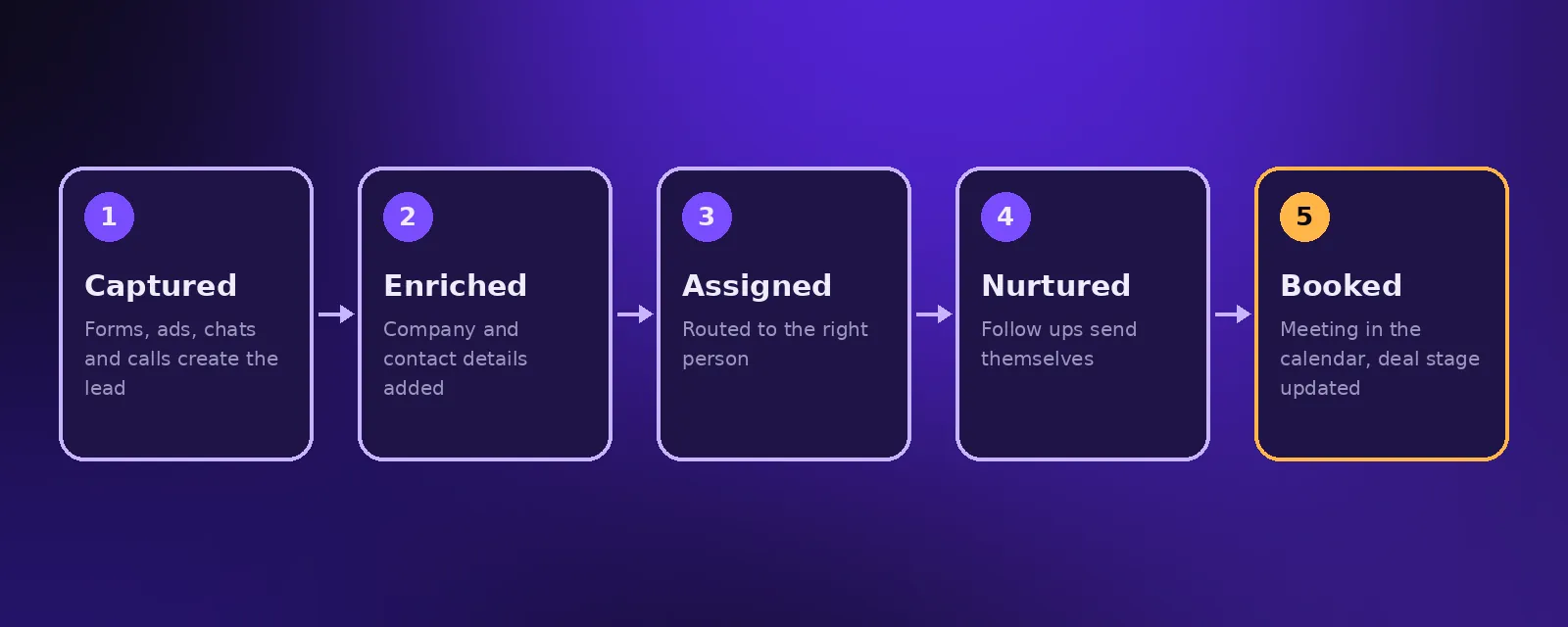
12 CRM workflows every sales team should automate
- Lead capture. Every form, ad, chat and call creates or updates a contact automatically.
- Speed to lead. New leads get an instant SMS, email or AI call within minutes.
- Lead enrichment. Company size, website and role are added automatically.
- Lead scoring. Leads are scored on fit and engagement so reps focus on the best ones.
- Round robin assignment. Leads are shared fairly or routed by region or service.
- Appointment booking. Prospects book straight into the right calendar, and the deal stage updates.
- Reminders. Automated reminders before calls and meetings reduce no shows.
- Nurture sequences. Leads who are not ready yet receive helpful emails over weeks.
- Stage based tasks. Moving a deal creates the next task for the right person.
- Proposal and contract triggers. Documents are generated from deal data when a stage is reached.
- Win and loss follow up. Won deals trigger onboarding; lost deals enter a reactivation sequence.
- Weekly pipeline report. An AI summary of new leads, wins and stuck deals is posted every Monday.
Choosing a CRM for automation
GoHighLevel
Popular with service businesses and agencies. It combines CRM, calendars, SMS, email and funnels in one place, which makes it strong for lead nurture and booking.
HubSpot
A well known CRM with strong marketing and reporting tools and a large ecosystem of integrations. Its automation features grow with the plan you choose.
Pipedrive
A sales focused CRM built around a visual pipeline. It is straightforward for small sales teams and connects well with workflow tools.
We set up all three and recommend the best fit during a free call. See CRM and pipeline setup.
Adding AI to CRM automation
AI takes CRM automation further. An AI agent can call or message a new lead, ask qualifying questions, log a summary of the conversation, score the lead and book a meeting, all before a person gets involved. See AI agents for business.
Signs your CRM needs automation
- Leads sit untouched for hours or days.
- Reps keep their own spreadsheets because the CRM is out of date.
- Nobody trusts the pipeline numbers.
- Follow ups depend on someone remembering.
Frequently asked questions
What is CRM automation?
CRM automation uses workflows and AI to capture leads, update records, send follow ups, move deals between stages and report, without manual data entry.
Can you move my existing contacts into a new CRM?
Yes. Contacts and deals can be imported from spreadsheets or your old CRM before pipelines and automations are set up around them.
Which CRM is best for automation?
GoHighLevel suits service businesses that want CRM, SMS and booking in one place, HubSpot suits teams that want strong marketing and reporting, and Pipedrive suits small sales focused teams.
How much does CRM automation setup cost?
Acceltor's CRM and pipeline setup starts from $1,290 and most setups are complete in one to two weeks, including team training.

Founder and CEO of Acceltor. Talha leads a team of engineers and designers building AI agents, automations, websites and apps for growing businesses.
Meet the team →