
- Automation means using technology to perform a task with little or no human effort. Automated means a task now runs on its own once it is set up.
- In business, automation ranges from single tasks, such as sending a reminder, to whole processes, such as taking a lead from enquiry to booked call.
- Modern automation technology combines workflow tools with AI, so software can also read messages, understand requests and make simple decisions.
Automation is one of the most used words in business today, and one of the least clearly defined. This guide explains what automation means, how automated systems work, the main types of automation technology and practical examples you can use in your own business.
What is automation? A simple definition
Automation is the use of technology to carry out a task or process with minimal human involvement. Once it is set up, an automated system follows instructions on its own: it watches for a trigger, then performs the steps it has been given, every time, in the same way.
What does automated mean?
Automated describes something that runs by itself after it has been configured. An automated email is sent without anyone pressing send. An automated invoice is created the moment a job is marked complete. An automated phone line answers calls without a receptionist.
How automation works
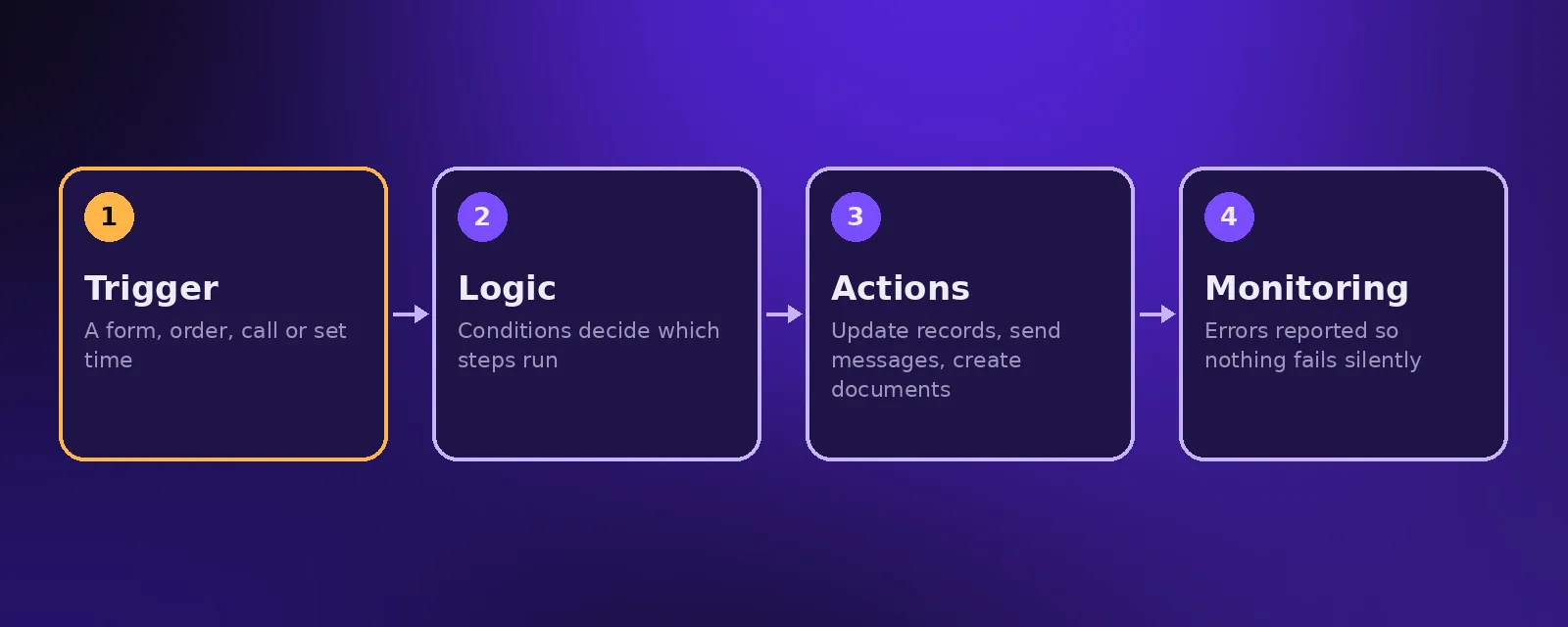
Almost every automation follows the same pattern:
- Trigger. Something happens, such as a form submission, a new order, a phone call or a set time of day.
- Logic. The system checks conditions and decides which steps to run.
- Actions. It performs the steps: updating records, sending messages, creating documents or calling another system.
- Monitoring. Good automations report errors so nothing fails silently.
Types of automation technology
Task automation
Automating one repetitive step, such as sending a confirmation email or adding a new contact to a list.
Business process automation
Connecting many steps and systems into one process, such as lead handling or client onboarding. See our guide to business process automation.
Robotic process automation (RPA)
Software bots that mimic clicks and keystrokes in existing applications. Compared in RPA vs intelligent automation.
AI automation
Automation that uses AI to understand language, read documents and decide what to do next, including AI agents that answer calls and messages.
Industrial automation
Machines and control systems that run manufacturing and physical processes. This guide focuses on business and office automation.
Examples of automation in business
- An AI receptionist that answers calls and books appointments around the clock.
- New website enquiries added to the CRM with an instant reply.
- Invoices created and sent automatically when a deal is won.
- Appointment reminders that reduce no shows.
- A weekly report written and posted to Slack every Monday.
Benefits of automation
- Time back for your team to spend on work that needs a person.
- Fewer errors than manual copying and typing.
- Faster responses to customers and leads, at any hour.
- Consistency, because every step runs the same way every time.
- Growth without the same growth in headcount.
Where to start
List the tasks your team repeats every week, estimate the hours each one takes, and start with the one that is frequent, rule based and costly. A free automation audit with Acceltor maps this for you. See our workflow automation service.
Frequently asked questions
What is the definition of automation?
Automation is the use of technology to carry out a task or process with minimal human involvement, following set instructions whenever a trigger occurs.
What does automated mean?
Automated means a task or process runs on its own after it has been set up, without someone doing each step by hand.
What is the difference between task automation and process automation?
Task automation handles one step, such as sending an email. Process automation connects many steps and systems into a complete process.
Is AI the same as automation?
No. Automation follows instructions, while AI can understand language and make simple decisions. Combining them lets automation handle tasks that used to need a person.

Founder and CEO of Acceltor. Talha leads a team of engineers and designers building AI agents, automations, websites and apps for growing businesses.
Meet the team →