
- Process automation software runs business processes automatically by connecting your apps, moving data and triggering actions.
- The main options are workflow automation platforms, RPA tools, automation built into your CRM or helpdesk, and intelligent automation solutions that add AI.
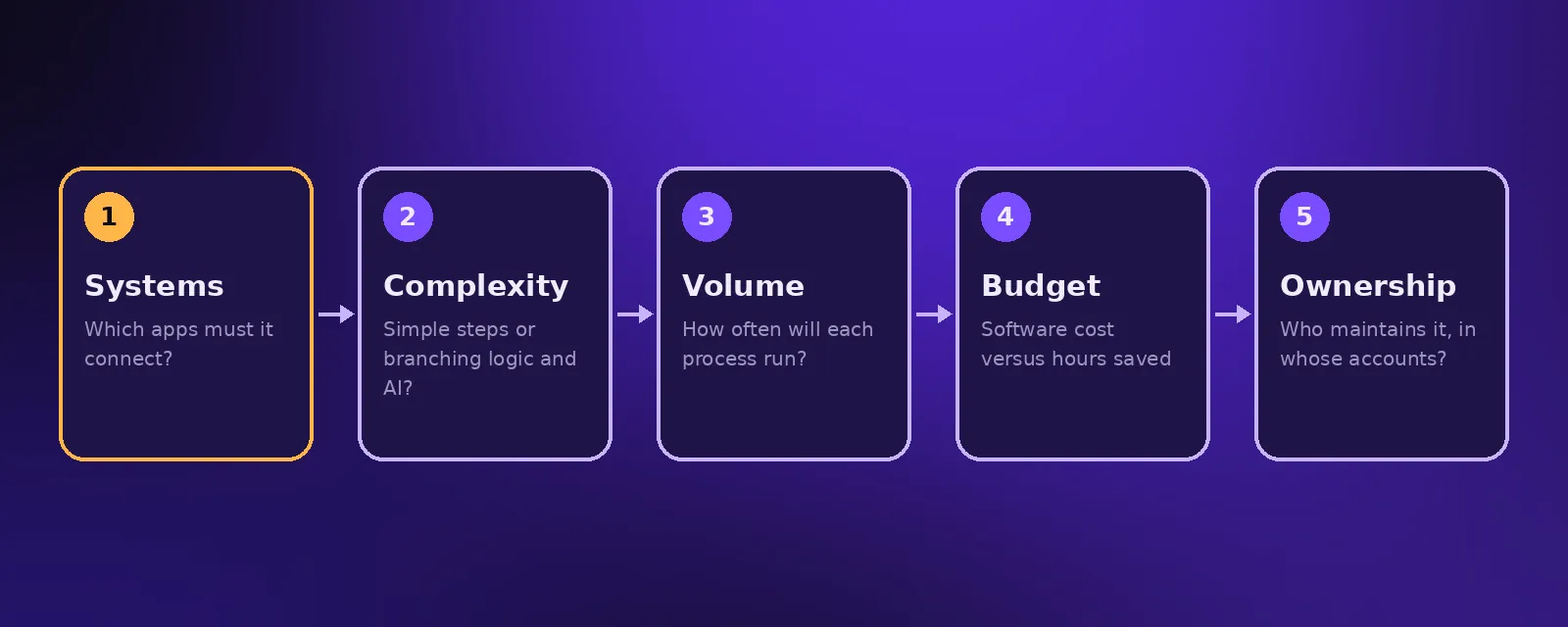
- Choose based on the systems you need to connect, how complex your processes are, your volume, your budget and who will maintain it.
There is no shortage of automation software. The challenge is choosing the right automation solution for your processes, your team and your budget. This guide explains the main types of process automation software, what IT process automation covers, and a simple framework for choosing.
What is process automation software?
Process automation software lets you define a trigger and a series of steps that run automatically, such as when a new order arrives, create the invoice, update stock and notify the warehouse. It replaces manual copy and paste work between systems.
Types of automation software
Workflow automation platforms
Tools such as n8n, Make and Zapier connect thousands of apps through their APIs. They suit most small and mid sized businesses. Compared in n8n vs Make vs Zapier.
RPA tools
Robotic process automation tools mimic a person clicking through screens. They are useful for older systems without APIs. See RPA vs intelligent automation.
Built in automation
CRMs, helpdesks and ecommerce platforms include their own automation features. They are convenient but usually limited to that one system. See CRM automation.
Intelligent automation solutions
These add AI to automation so it can read emails and documents, understand conversations and make simple decisions. They include AI agents that answer calls and messages.
What is IT process automation?
IT process automation applies the same idea to IT work: creating and removing user accounts, resetting passwords, granting access, provisioning software and responding to alerts. For growing businesses, the biggest wins are usually automated onboarding and offboarding, so new staff get every account on day one and leavers lose access straight away.
How to choose an automation solution
- Systems. List every app the process touches. Check each one has an integration or API.
- Complexity. Simple, linear processes suit easy tools. Branching logic, loops and AI steps need more capable platforms.
- Volume. Many tools charge per task or operation, so estimate how often each process runs.
- Budget. Compare the monthly software cost with the hours the automation saves.
- Ownership. Decide who will maintain it, and make sure it is built in accounts you own.
Mistakes to avoid
- Buying an expensive enterprise platform for a handful of simple processes.
- Using screen based RPA when a reliable API integration exists.
- Building automations without error alerts or documentation.
- Spreading automations across many tools with nobody responsible for them.
Need help choosing?
Acceltor builds automations on n8n, Make and Zapier and adds AI where it helps, all inside your own accounts. Start with a free audit. See workflow automation.
Frequently asked questions
What is the best process automation software for small businesses?
For most small businesses, a workflow automation platform such as Zapier, Make or n8n is the best fit because it connects many apps without a large upfront cost.
What is IT process automation?
IT process automation uses software to handle IT tasks such as creating and removing user accounts, granting access, resetting passwords and responding to system alerts.
What are intelligent automation solutions?
Intelligent automation solutions combine automation with AI so processes can include steps like reading documents, understanding messages and making simple decisions.
How much does process automation cost?
Software costs depend on the tool and volume. Acceltor's workflow automation builds start from $1,490 with a fixed quote after a free audit.

Founder and CEO of Acceltor. Talha leads a team of engineers and designers building AI agents, automations, websites and apps for growing businesses.
Meet the team →