
- Finance automation uses workflows and AI to handle invoicing, payment reminders, expense capture, reconciliation and reporting with less manual work.
- The fastest wins are automatic invoices when work is won or completed, overdue reminders and receipts read by AI.
- Keep approvals for payments and anything unusual with a person, and automate the data entry around them.
Finance admin is repetitive, time consuming and unforgiving of mistakes. Typing invoice details, chasing late payments and matching transactions every month are exactly the kind of tasks software does well. Finance automation frees up those hours and gives you cleaner numbers.
What is finance automation?
Finance automation is the use of software and AI to complete financial tasks automatically, by connecting your CRM, store, bank feeds and accounting software such as Xero or QuickBooks, so data flows between them without manual entry.
Finance tasks you can automate
Accounts receivable
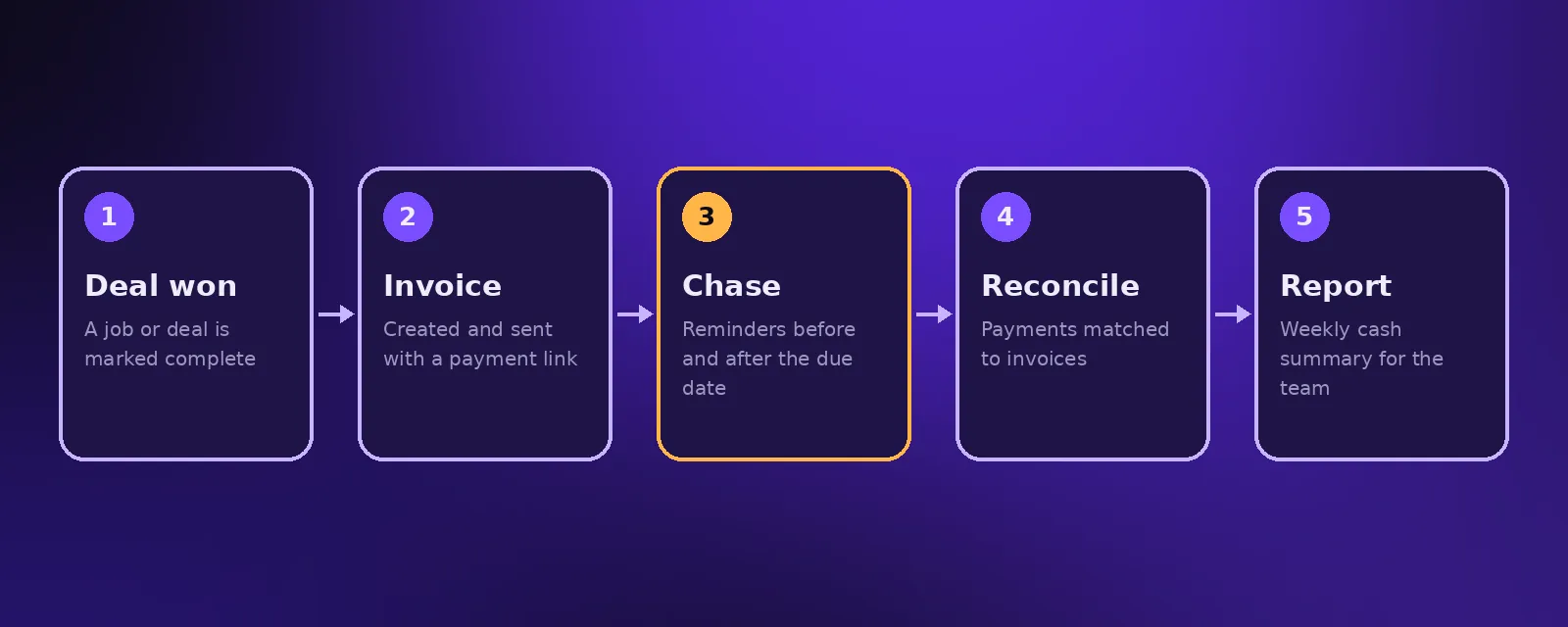
- Invoices created automatically when a deal is won or a job is completed.
- Friendly reminders sent before and after due dates.
- Payment links included so customers can pay straight away.
- Paid invoices marked and the CRM updated.
Accounts payable and expenses
- Supplier invoices and receipts read by AI and the key details extracted.
- Bills matched to purchase orders, with mismatches flagged for review.
- Approval requests routed to the right person.
Reconciliation and reporting
- Transactions matched against invoices and orders.
- Ecommerce sales, fees and refunds synced into accounting.
- A weekly cash and revenue summary posted for the team.
Benefits of finance automation
- Faster payment because invoices go out immediately and reminders never get forgotten.
- Fewer errors from manual typing.
- Up to date numbers instead of waiting for month end.
- Hours saved every week for founders and finance staff.
Keep control where it matters
Automate the preparation and the data entry, not the judgement. Keep a person approving payments, refunds and anything that looks unusual, use clear audit logs, and limit access to financial systems to the people who need it.
How to start
- Map how money moves through your business, from quote to payment.
- Pick the step that takes the most time, usually invoicing or chasing payments.
- Connect your CRM or store to your accounting software.
- Add AI for documents and receipts once the basics are running.
Acceltor connects CRMs, stores and accounting tools with n8n and Make, and adds AI document reading where it helps. See workflow automation and our guide to business process automation.
Frequently asked questions
What is finance automation?
Finance automation uses software and AI to handle financial tasks such as invoicing, payment reminders, expense capture, reconciliation and reporting automatically.
Can finance automation work with Xero or QuickBooks?
Yes. Workflow tools such as n8n and Make connect to Xero and QuickBooks, so invoices and transactions can be created and synced automatically.
Is it safe to automate finance tasks?
Yes, when approvals for payments and unusual items stay with a person, every action is logged and access to financial systems is limited.
What should I automate first in finance?
Automatic invoicing and overdue payment reminders are usually the best first steps because they speed up cash flow straight away.

Founder and CEO of Acceltor. Talha leads a team of engineers and designers building AI agents, automations, websites and apps for growing businesses.
Meet the team →