
- Task automation hands individual repetitive tasks, such as data entry, reminders, file sorting and status updates, to software.
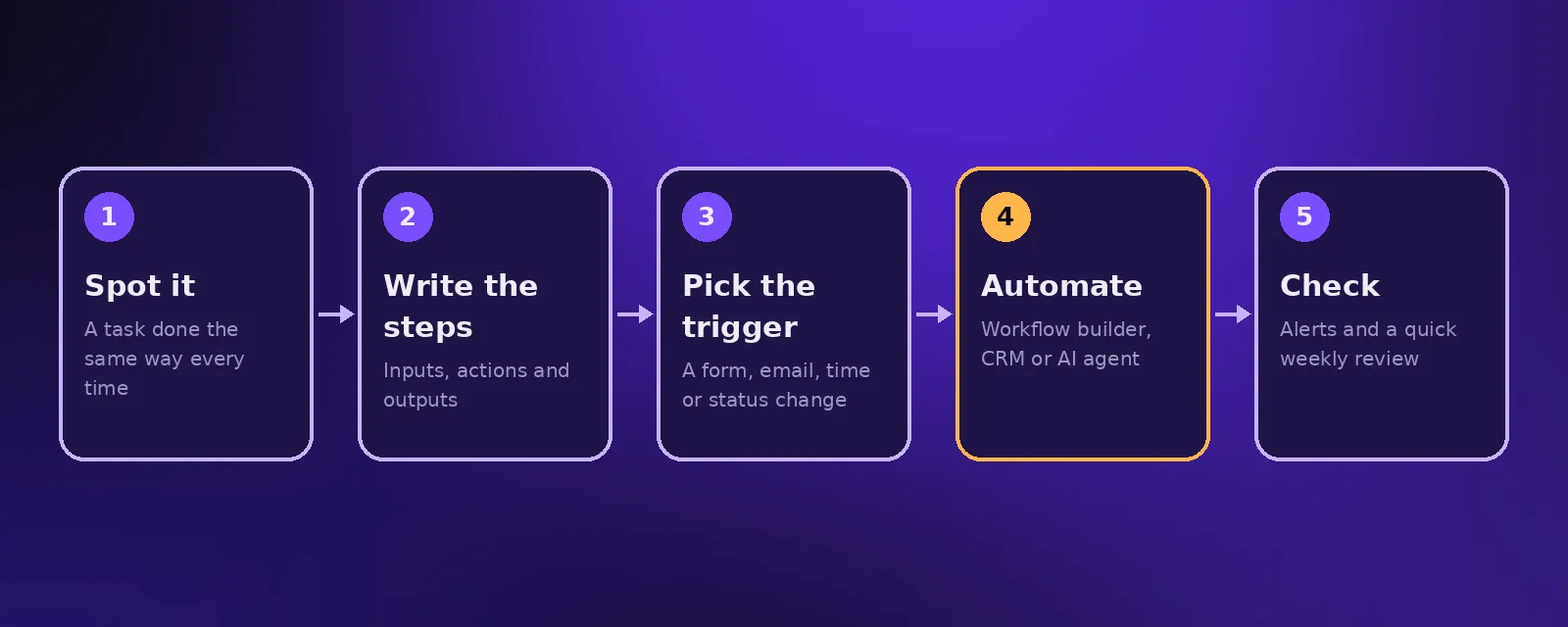
- Look for tasks that are frequent, follow the same steps each time and involve copying information between tools.
- Start with a handful of small automations, then link them into full process automation once they are proven.
Most teams lose hours every week to small tasks that nobody notices individually: copying a lead into the CRM, sending a reminder, renaming a file, updating a status. Task automation removes them one by one. Here are 30 tasks almost any business can automate today.
What is task automation?
Task automation is using software to complete a single repetitive task without a person. It is the building block of larger business process automation: automate the tasks first, then join them into end to end processes.
30 tasks you can automate
Sales
- Adding website, ad and email leads to your CRM.
- Sending an instant reply to every new enquiry.
- Assigning leads to the right salesperson.
- Follow up emails and texts until a lead replies.
- Booking meetings and sending reminders.
- Updating deal stages after calls.
Customer service
- Answering common questions on chat and WhatsApp.
- Order and booking status updates.
- Routing tickets to the right person.
- Requesting reviews after a job or purchase.
- Sending satisfaction surveys.
- Answering the phone after hours with an AI receptionist.
Operations
- Creating projects and tasks when a deal is won.
- Sending onboarding forms and chasing missing ones.
- Saving email attachments to the right folder.
- Generating documents from templates.
- Scheduling staff and sending shift reminders.
- Syncing stock levels between store and warehouse.
Finance
- Creating and sending invoices.
- Payment reminders before and after due dates.
- Matching payments to invoices.
- Reading receipts and supplier bills with AI.
- Weekly cash and revenue summaries.
HR and admin
- Collecting job applications in one place.
- Scheduling interviews.
- Setting up accounts for new starters.
- Removing access when someone leaves.
- Holiday requests and approvals.
- Meeting notes and action items.
- Weekly team reports in Slack or email.
Tools for task automation
Most of these tasks can be automated with a workflow builder such as Zapier, Make or n8n, the automation inside your CRM, or an AI agent where language is involved. See our guides to automation software and HR automation.
Frequently asked questions
What is task automation?
Task automation is using software to complete individual repetitive tasks, such as data entry, reminders and file handling, without manual work.
What is the difference between task automation and process automation?
Task automation handles one step. Process automation connects many steps, people and systems into a complete workflow from start to finish.
What tasks should not be automated?
Tasks that need empathy, negotiation or complex judgement, and anything where an error would be costly without review, should stay with people or have human approval.
How quickly can I automate tasks?
Simple task automations can be live in days. Acceltor usually starts with a free audit and delivers the first automations within one to two weeks.

Founder and CEO of Acceltor. Talha leads a team of engineers and designers building AI agents, automations, websites and apps for growing businesses.
Meet the team →