
- Most businesses do not need to train an AI model from scratch. Creating an AI today usually means building on an existing model with your own instructions, knowledge and tools.
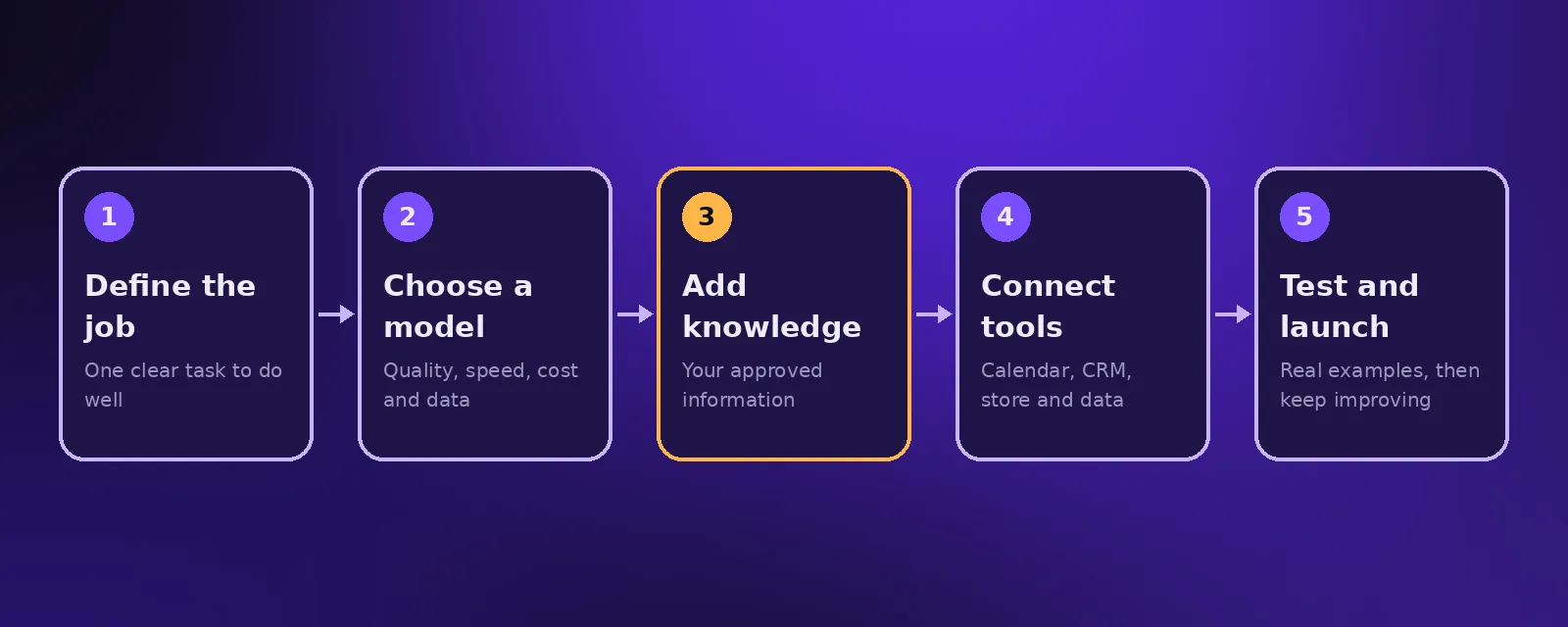
- The main steps are: define the job, choose a model, add your knowledge, connect tools, add guardrails, test with real examples and launch.
- No code platforms work for simple assistants, while custom code in Python gives more control for serious products.
"How do I create an AI?" is one of the most common questions we hear. The good news is that you no longer need a research team or a huge dataset. This guide explains the practical ways to make an AI for your business, from a simple assistant to a custom AI product.
Three ways to create an AI
1. Build on an existing model (most common)
Large language models from providers such as OpenAI and Anthropic already understand language. You give the model instructions, your own information and access to tools, and it becomes an assistant for your business. This is how most chatbots, voice agents and AI tools are built today.
2. Fine tune a model
Fine tuning adjusts a model with examples so it follows a specific style or format more reliably. It helps in some cases, but most business needs are met with good instructions and retrieval of your own documents.
3. Train a model from scratch
Training a new model needs large datasets, specialist skills and significant computing budget. It makes sense for research labs and very specific problems, such as a custom vision model, not for most business assistants.
How to make an AI, step by step
- Define one job. For example: answer customer questions and book appointments. A narrow job is easier to build and measure.
- Choose a model. Pick based on quality, speed, cost and data handling. Voice agents also need speech recognition and a natural voice.
- Write the instructions. Role, tone, what it should and should not do, and when to hand over to a person.
- Add your knowledge. Services, prices, policies and FAQs, usually through retrieval so answers come from your approved information.
- Connect tools. Calendar, CRM, store or database, so the AI can take actions as well as answer.
- Add guardrails. Limits, approvals for sensitive actions and logging of every conversation.
- Test with real examples. Include tricky and off topic questions.
- Launch and improve. Review conversations and refine the instructions and knowledge.
We go deeper into agents in how to build AI agents and AI chatbot development.
No code or custom code?
No code platforms are quick for a simple assistant or internal helper. Custom development, usually in Python, is better when you need tight integrations, your own data pipeline, strict security or a product you will sell. See AI Python development for business and our custom AI tools service.
What it costs to create an AI
A focused AI assistant built on an existing model costs far less than most people expect. Ongoing costs are mainly model usage and hosting. At Acceltor, AI agent plans start at $299 a month and custom AI tools start from $4,500 with a fixed quote.
Frequently asked questions
Can I create my own AI?
Yes. Most people create an AI by building on an existing language model with their own instructions, knowledge and tools, rather than training a model from scratch.
Do I need to know how to code to make an AI?
Not for simple assistants, which can be built on no code platforms. Coding helps when you need custom integrations, security controls or a product you will sell.
How long does it take to build an AI assistant?
A focused chat assistant can go live in one to two weeks and a voice agent in two to three weeks, including testing.
How do I stop an AI from making things up?
Ground it in your approved information, tell it to say when it does not know, limit its scope and review conversations regularly.

Founder and CEO of Acceltor. Talha leads a team of engineers and designers building AI agents, automations, websites and apps for growing businesses.
Meet the team →