
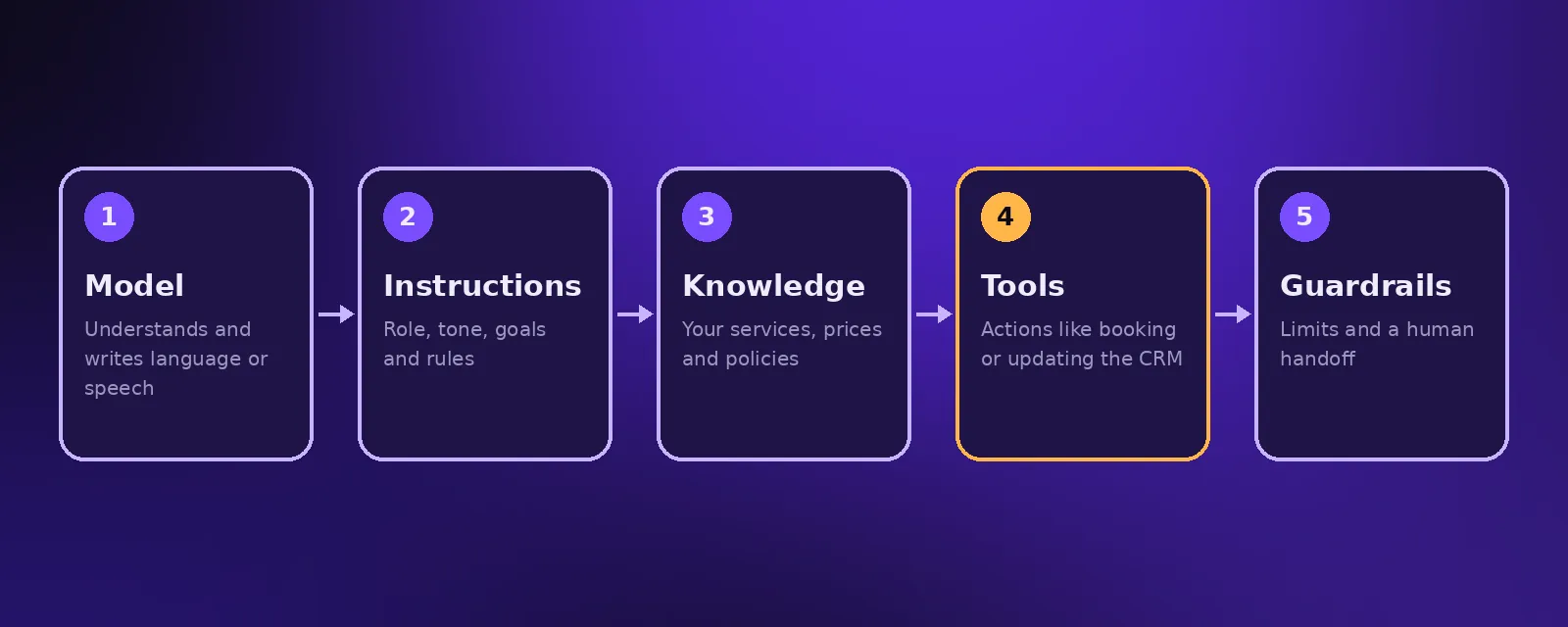
- An AI agent is built from five parts: a language model, instructions, tools it can use, memory and guardrails.
- To build one, define a single goal, gather the knowledge it needs, connect the tools, write clear rules and a human handoff, then test with real scenarios.
- No code platforms make simple agents quick to build; production agents need careful integration, monitoring and testing.
Building an AI agent sounds technical, but the core idea is simple: give an AI model a clear job, the information and tools it needs to do that job, and the rules it must follow. This guide explains how AI agents are put together and walks through the steps to create one for your business, whether you build it yourself or work with a team.
What is an AI agent? Definition and architecture
An AI agent is software that uses a language model to understand requests and decide what action to take to reach a goal. Most business agents share the same architecture:
- Model. The language model that understands and generates text or speech, such as models from OpenAI or Anthropic.
- Instructions. The role, tone, goals and rules the agent follows.
- Knowledge. Your business information: services, prices, policies and FAQs.
- Tools. Actions the agent can take, such as checking a calendar, creating a booking or updating a CRM.
- Memory. The conversation so far, and sometimes past interactions with the customer.
- Guardrails. Limits on what it may do or say, and when it must hand off to a person.
Types of AI agents
- Conversational agents answer and act inside a chat or phone call, such as an AI receptionist.
- Task agents run in the background on a trigger, such as reading invoices or qualifying leads.
- Multi agent systems split a larger job between several specialised agents, coordinated by a workflow.
How to build an AI agent in 7 steps
1. Choose one clear goal
Start narrow. Book appointments for new patients is a good goal. Handle all customer service is not. A single goal makes the agent easier to build, test and measure.
2. Map the conversation or task
Write down what the agent needs to ask, what it needs to check and what a successful outcome looks like. Include the awkward cases too.
3. Gather the knowledge
Collect the approved information the agent will use: services, prices, hours, policies and common answers. Keep it accurate and up to date.
4. Connect the tools
Give the agent only the actions it needs, for example read the calendar, create a booking and add a CRM note. Each tool should have clear inputs and outputs.
5. Write instructions and guardrails
Define the role, tone, what it must never do, and exactly when it should transfer to a person.
6. Test with real scenarios
Run dozens of realistic conversations, including confusing and off topic ones. Fix every wrong answer before launch.
7. Launch, monitor and improve
Review transcripts and outcomes regularly. Most of an agent's quality comes from tuning after launch.
Frameworks and platforms for building AI agents
- Voice agent platforms such as Vapi handle phone calls, speech recognition and natural sounding voices.
- Workflow tools such as n8n and Make connect agents to your business systems and can run agent steps themselves.
- Developer frameworks and model provider SDKs give full control for custom agents and products.
Build it yourself or hire a team?
A simple FAQ bot is a good DIY project. Agents that talk to customers, take payments, book appointments or touch several systems need careful integration, testing and monitoring. That is where an AI team saves time and risk. Acceltor builds voice agents, chat agents and custom AI tools in your own accounts, so you own everything.
Frequently asked questions
How do you create an AI agent?
Choose one clear goal, gather the knowledge it needs, connect the tools it will use, write instructions and guardrails including a human handoff, test with real scenarios, then launch and keep improving it.
Do I need to know how to code to build an AI agent?
Simple agents can be built with no code platforms. Agents that integrate with several business systems usually need technical setup, testing and monitoring.
How long does it take to build an AI agent?
A focused business agent typically takes one to three weeks from planning to launch, including testing.
What is the difference between how to make AI and how to build an AI agent?
Making AI from scratch means training models, which few businesses need. Building an AI agent means using an existing model with your instructions, knowledge and tools to complete a task.

Founder and CEO of Acceltor. Talha leads a team of engineers and designers building AI agents, automations, websites and apps for growing businesses.
Meet the team →