Small businesses that use AI automation save an average of 2.5 hours per employee every single day. That is time spent on real work, not copying data between spreadsheets or answering the same email for the 40th time this month. If you run a small business, you are likely doing tasks right now that a machine could handle. This guide will show you what AI automation is, why it matters, and exactly how to start using it without a big budget or a tech team.
77% of small business owners say repetitive admin tasks take up more than 10 hours per week. AI automation can recover most of that time.
What Is AI Automation for Small Businesses?
AI automation means using software powered by artificial intelligence to handle tasks that would normally need a human. Things like replying to customer questions, scheduling appointments, sending invoices, or sorting emails.
It is different from old-school automation. Old automation follows rigid rules. AI adapts. It can read a customer message, understand what they want, and respond in plain language, just like a person would.
You do not need to write code or hire a developer. Most AI tools for small businesses are plug and-play apps you set up in minutes.
Why AI Automation Matters for Small Businesses
Big companies have entire departments for marketing, customer support, and finance. You probably do not. AI automation levels the playing field.
Here is what the numbers say. According to McKinsey, businesses that adopt AI process automation see a 20 to 35 percent reduction in operational costs. For a small business spending $10,000 a month on operations, that is up to $3,500 saved every month.
Beyond cost, speed matters. A customer who gets an instant reply converts at a much higher rate than one who waits 24 hours. Automated responses can reply in seconds, any time of day.
Small business AI tools also reduce human error. A miscalculated invoice or a missed follow-up email can cost you a client. Automated systems do not get tired or distracted.
How AI Automation Works: A Step-by-Step Breakdown
- Map Your Repetitive Tasks: Before you touch any tool, write down every task you or your team repeat more than once a week. Examples: sending welcome emails, booking calls, chasing unpaid invoices, answering FAQs. These are your automation targets.
- Pick the Right AI Tool for Each Task: Different tools solve different problems. For customer chat: Tidio or Intercom. For email
follow-ups: Mailchimp or Active Campaign. For scheduling: Calendly with AI features. For invoicing and bookkeeping: QuickBooks AI or FreshBooks. Start with one tool, not ten. - Connect Your Tools with a Workflow App: Apps like Zapier or Make (formerly Integromat) connect your existing software so data
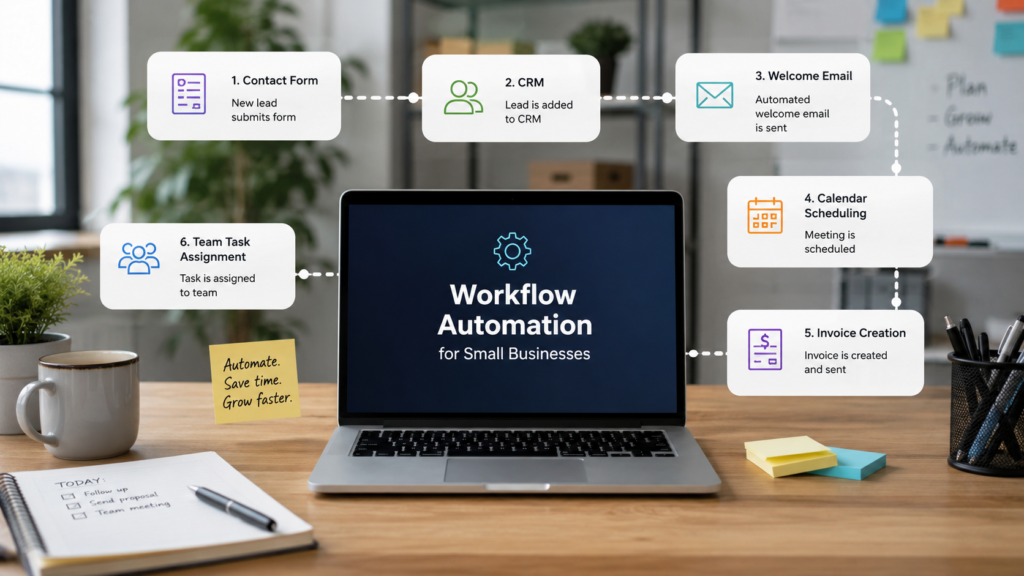
flows automatically. Example: when a new customer fills out your contact form, Zapier can add them to your CRM, send a welcome email, and create a task for your team. - Train and Test Your Automation: Most AI tools need a small amount of setup. You feed them your FAQs, email templates, or product information. Then run test scenarios to see how they respond. Fix anything that sounds robotic or wrong before going live.
- Monitor and Improve Over Time: AI automation is not a set-it-and-forget-it situation. Check your tools weekly in the first month. Look at where customers drop off in a chatbot conversation. Look at which automated emails get ignored. Adjust based on what the data tells you.

Key Benefits of AI Automation for Small Businesses
Whether you’re a small startup or an established business, there are many ways AI and Python can help you grow:
- Time back in your day: Eliminate hours of admin work weekly so you focus on growth, clients, and strategy instead of
repetitive tasks. - Lower operating costs: Automation handles work without adding headcount, reducing your cost per task dramatically.
- Better customer experience: Fast, consistent replies build trust. Customers get answers at midnight, not the next morning.
- Scalable growth: Handle 10x more customers without hiring 10x more staff. Your systems grow with your business.
- Fewer mistakes: Automated workflows are consistent. No missed emails, no wrong invoice amounts, no forgotten
follow-ups. - Smarter decisions: AI tools surface data patterns you would miss manually, helping you make better business calls.
Common Mistakes to Avoid with AI Automation
- Automating before you understand the process. If a task is broken or unclear, automating it makes it worse faster. Fix the process first, then automate it.
- Starting with too many tools at once. Businesses that try to automate everything in week one end up with tangled systems. Pick one high-impact area and get it right first.
- Removing all human touchpoints. AI handles routine tasks well. But complex complaints, big sales conversations, and sensitive situations still need a real person.
- Ignoring GDPR and data privacy rules. When you automate customer communication, you are handling personal data. Make sure your tools comply with local data laws.
- Never reviewing the output. A chatbot giving wrong answers for three months is worse than no chatbot at all. Review automated messages monthly and update them when things change.

Frequently Asked Questions
1.How much does AI automation cost for a small business?
Most entry-level AI automation tools cost between $20 and $100 per month. Zapier starts free with basic workflows. AI chatbots like Tidio have free plans. You can start automating for under $50 a month and scale up as the results justify the cost.
2.Do I need technical skills to set up AI automation?
No. Most tools designed for small businesses use drag-and-drop builders and plain-language setup. If you can use email and a spreadsheet, you can set up basic AI automation. More advanced workflows may need a freelancer, which is usually a one-time cost.
3.What tasks should I automate first?
Start with the highest-volume, lowest-complexity tasks. Good first choices are: customer FAQ replies, appointment booking confirmations, payment reminder emails, and social media post scheduling. These give you fast wins without risk.
4.Will AI automation replace my employees?
It will change what they spend time on, not replace them. Automation handles repetitive tasks, which frees your team to do work that needs human judgment. Most small businesses use AI to avoid their next hire, not to cut existing staff.
5.Is AI automation safe and reliable for small business use?
Yes, when you choose reputable tools. Platforms like HubSpot, Mailchimp, Zapier, and QuickBooks have enterprise-level security and uptime guarantees. Always check that a tool stores data on secure servers and complies with relevant privacy regulations.
Start Small, Win Big
AI automation for small businesses is not a future trend. It is a practical tool available right now, at prices that work for lean teams and solo founders.
You do not need to automate everything at once. Pick one repetitive task that eats your time every week. Find the right tool, set it up, and watch what happens to your schedule. That is all it takes to start.
The businesses pulling ahead right now are not doing more. They are doing the same things faster, cheaper, and with fewer mistakes, because they let machines handle what machines do best.